Two advertisers. Same keyword. Same bid. One pays 40% less per click and ranks higher. That gap comes down to quality score, and in Google Ads, quality score determines where your ad appears and what you actually pay each time someone clicks. Most advertisers don't fully understand how it works, or how much it's quietly draining their budgets every single month. (Note: the 40% figure is a plausible illustration based on published CPC discount estimates for high-quality-score accounts; actual savings vary by auction and competition.)
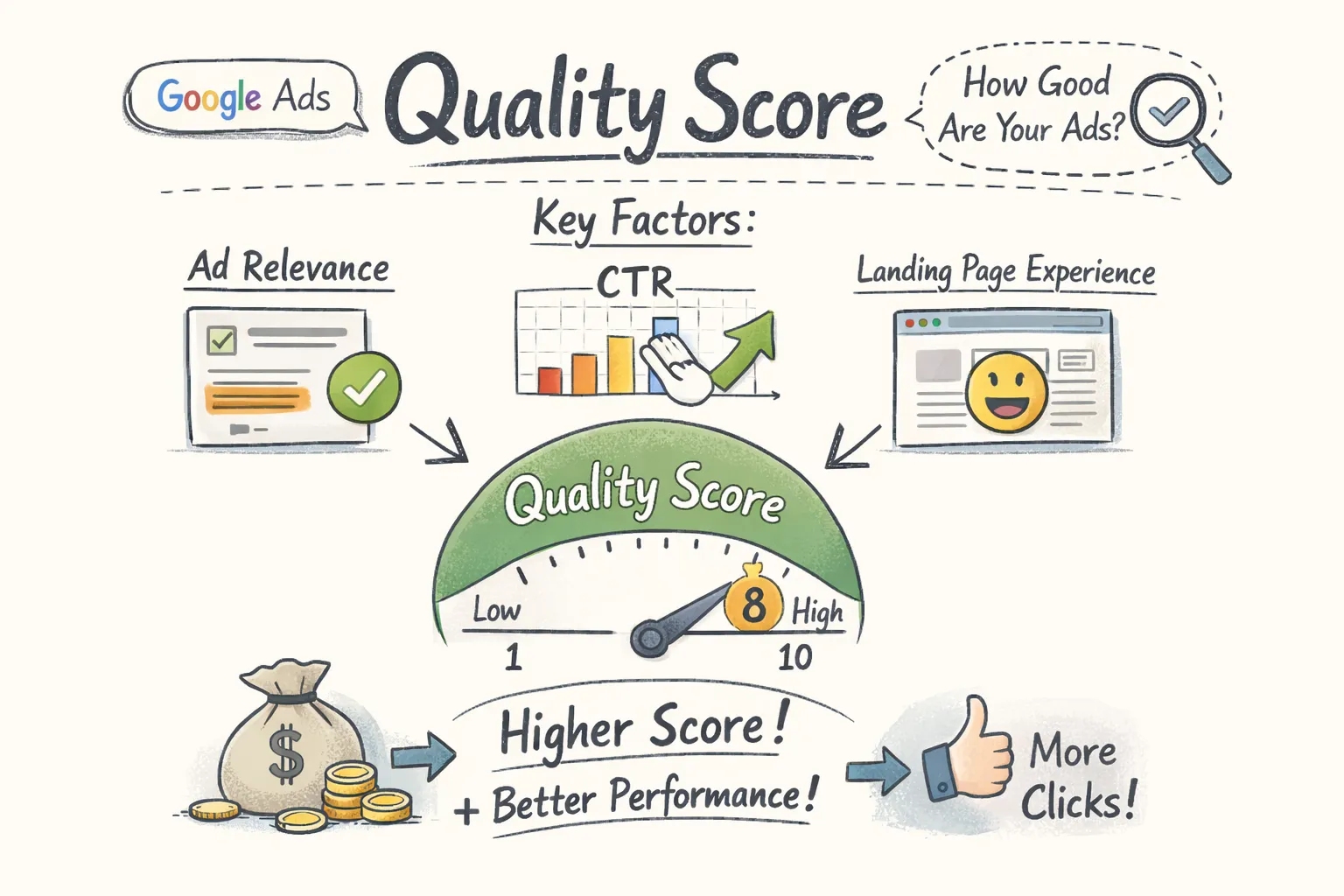
Google assigns a Quality Score of 1 to 10 to every keyword in your account. It's not a cosmetic metric. It directly influences your ad position and your cost per click through the underlying quality signals Google factors into every auction. A score of 3 means you're likely paying substantially more per click than a competitor bidding the same amount with a score of 7, in some cases well over double. That gap compounds across thousands of clicks, and the losses add up fast.
This article breaks down exactly what Quality Score measures, how it feeds into Ad Rank and your actual CPC, what scores to realistically aim for, and the specific changes that move the needle. By the end, you'll know where your account probably stands and what to do about it.
The three components that determine your Quality Score
Quality Score is built from three sub-scores, each rated as Above Average, Average, or Below Average. Google evaluates all three relative to competing ads in the same auction over the previous 90 days, not against a fixed benchmark. Understanding what each one measures tells you exactly where to direct your energy when scores are low.
Are hidden account issues quietly draining your budget?
CheckMyAds surfaces the exact keywords, components, and cost drivers behind waste so you know what to fix first.
Request Free AuditExpected CTR: Google's prediction before anyone clicks
Expected CTR estimates the likelihood that a user will click your ad when it appears for a given keyword. Google bases this on historical performance signals and auction-time data, comparing your predicted click-through rate against other ads competing in the same auction. A Below Average rating here means your ad isn't compelling enough relative to what competitors are showing for the same searches.
Common fixes include headline rewrites, tighter keyword matching, testing stronger calls to action, and adding negative keywords to filter out searches where your ad has no business showing. If your ad appears for "emergency plumber London" but your headline reads "Professional Plumbing Services," you're leaving relevance on the table. The gap between what someone searches and what your headline says is usually where expected CTR breaks down.
Ad relevance: how well your message matches the search intent
Ad relevance measures how closely your ad copy aligns with both the user's search query and the keyword you're targeting. Generic ad copy that tries to speak to too many different keywords at once will always score below average here. If someone searches "accounting software for freelancers" and your ad mentions business finance tools broadly, that mismatch registers as a relevance problem.
A Below Average ad relevance rating is often a structural signal rather than a copywriting problem. It frequently means your ad group contains loosely related keywords that no single ad can speak to with precision. Splitting those groups and rewriting headlines to mirror the specific search theme is the most direct path to improvement.
Landing page experience: what happens after the click
Landing page experience evaluates what users encounter after they click your ad. Google looks at content relevance to the ad and keyword, page load speed, mobile usability, navigation clarity, and whether the page is transparent and trustworthy. A landing page that sends users to a generic homepage when they clicked an ad about a specific product will score poorly, because the page fails to deliver on the ad's promise.
The technical side matters just as much as the content. Slow load times, poor mobile layouts, and pages cluttered with pop-ups all push this score down. Google's PageSpeed Insights is a useful free diagnostic for the technical side. For content relevance, the test is simple: does your landing page explicitly address what the ad promised, with the primary keyword appearing in the headline and early body copy? For a concise [guide to Google Ads Quality Score](https://landingi.com/digital-advertising/google-ads-quality-score/), see this overview.
How Quality Score shapes Ad Rank and what you actually pay per click
The financial consequences of a low ad quality score aren't abstract. They show up in your invoices every month. Understanding the mechanics makes it clear why improving relevance beats raising your bid almost every time.
The Ad Rank formula and what it means for your position
Ad Rank determines which ads appear and in what order. Google doesn't publish its exact formula, but a widely used simplification is: Ad Rank = Max Bid × Quality Score, with ad extensions and other contextual signals adding further influence on top. The multiplication is what makes the score so powerful. A $2 bid paired with a Quality Score of 9 produces an Ad Rank of 18. A $3 bid with a Quality Score of 5 produces only 15. The lower bidder wins the higher position because of relevance, not budget. This is a simplified model, actual Ad Rank calculations incorporate additional signals Google doesn't disclose publicly. For Google's official explanation of Quality Score see [Google's documentation on Quality Score](https://support.google.com/google-ads/answer/6167130?hl=en).
This mechanic is what allows well-optimized accounts to outrank competitors spending significantly more. It also explains why ad extensions (sitelinks, callouts, structured snippets) are worth populating carefully: they add to your effective Ad Rank on top of the base calculation, making skipping them a genuinely costly mistake.
The CPC discount and penalty that hits your budget directly
Your actual CPC in Google's auction is calculated based on the Ad Rank of the advertiser below you divided by your Quality Score, plus one cent. Higher scores reduce what you pay; lower scores inflate it significantly. Relative to a baseline score of 5, the impact at each level is stark (figures are industry estimates based on published PPC research and vary by auction and competitive environment):
- Quality Score 9, 10: roughly 44, 50% CPC reduction
- Quality Score 7: approximately 29% discount
- Quality Score 3: approximately 150% penalty (paying more than double)
- Quality Score 1: up to 400% penalty, with the ad rarely shown at all
These aren't edge cases. If you have 20 keywords sitting at a score of 3 and each gets 500 clicks a month, the overpayment relative to a score of 7 is substantial, thousands of dollars monthly at typical CPCs. Improving relevance isn't a nice-to-have optimization; it's a budget recovery strategy.
What a good score looks like and how to spot problem keywords
Before you can fix problems, you need to know where they are. That starts with understanding what "good" actually means in context, then running a targeted diagnostic in your account.
Google Ads Quality Score benchmarks worth keeping in mind
The industry average sits around 5 out of 10, based on aggregated PPC industry data rather than official Google benchmarks. Scores of 7 and above are generally considered strong. Branded keywords (where someone searches your exact company name) typically score 8 to 10 because the ad-to-search alignment is nearly perfect. Non-branded, competitive keywords often cluster between 4 and 6.
Industry context matters. Legal and finance accounts tend to score lower due to competitive auctions and the tendency toward generic landing pages. SaaS and travel accounts with tightly grouped ad groups often score higher. A realistic improvement target is 1 to 2 points over three to six months with focused changes, and that improvement can deliver meaningful CPC reductions on your most important keywords, which at significant spend levels represents a strong return on optimization effort.
Finding low-score keywords inside Google Ads
The manual diagnostic starts in the Keywords tab. Add Quality Score, Expected CTR, Ad Relevance, and Landing Page Experience as custom columns, then filter for keywords scoring below 5 or any subcomponent rated Below Average. Sort by impression volume rather than by score alone. A keyword scoring 4 with 10 impressions per month isn't worth your attention; a keyword scoring 4 with 2,000 impressions per month is costing you real money.
The Search Terms report adds another layer of insight. Irrelevant queries that your ads are matching against drag down CTR and, by extension, the expected CTR component over time. Reviewing this report and adding negative keywords for poor-fit queries is one of the fastest ways to lift that component, a cleanup task with immediate impact on the signals Google uses to evaluate your ads. A practical walkthrough on how to [find and fix underperforming keywords](https://twospouts.com/find-and-fix-underperforming-keywords-in-google-ads/) complements this approach.
Proven tactics to raise your score across all three components
Score improvements don't come from a single change. The accounts that see the biggest gains tackle all three components with specific, structural changes rather than surface-level tweaks.
Restructure your ad groups around tighter keyword themes
Broad ad groups are a Quality Score trap. When one ad group contains a wide mix of loosely related keywords, no single ad can be highly relevant to all of them. The result is a permanently average ad relevance score across the entire group. Restructuring around tight keyword themes, where each ad group covers a specific cluster of closely related terms, allows the ad copy to mirror search intent precisely.
For high-value terms where every impression matters, single keyword ad groups (SKAGs) give you maximum control: one keyword, one ad set, one landing page. The management overhead is higher, but for keywords driving significant spend, the relevance gains are worth it. Start with your top 10 keywords by cost and restructure those first before expanding.
Rewrite ad copy to directly reflect the search query
The user's search term should appear in your ad headline wherever it fits naturally. This isn't about keyword stuffing, it's about signal matching. An ad for "buy running shoes online" performs better when the headline reads "Buy Running Shoes Online" than when it reads "Shop Athletic Footwear." The match between search and headline is exactly what Google's expected CTR evaluation rewards.
Dynamic Keyword Insertion can automate this at scale, but it requires careful monitoring. If your keyword list includes long or awkward phrases, DKI can produce headlines that read strangely, which hurts CTR rather than helping it. Test it on tightly themed ad groups first. Ad extensions (sitelinks, callouts, structured snippets) also contribute to CTR signals and should be populated with specific, benefit-driven copy rather than generic filler. For additional tactical guidance on improving overall quality scoring, see this practical piece on [improving Quality Score for Google Search ads](https://www.americaneagle.com/insights/blog/post/improving-quality-scoring-of-google-search-ads).
Fix the disconnect between your ad and your landing page
The most common landing page failure in Google Ads is sending paid traffic to a homepage or a broad category page instead of the specific product or service the user searched for. Google evaluates whether the landing page delivers on the ad's promise, and a mismatch here tanks the landing page experience score regardless of how well your ads and keywords align.
Run each landing URL through PageSpeed Insights and check two things: load time on mobile and whether the primary keyword appears in the page headline and early copy. Page speed is a direct input into Google's technical evaluation, and improving it for high-traffic keywords can lift your landing page experience score meaningfully over time. The faster the traffic volume, the sooner those quality signals update.
How CheckMyAds automatically surfaces low-scoring keywords
The manual process described above works. It's also slow, easy to deprioritize when you're managing multiple campaigns, and easy to get wrong when you're looking at hundreds of keywords across dozens of ad groups. That's exactly the problem CheckMyAds was built to solve.
What the audit detects and why it matters at scale
CheckMyAds automatically scans your entire Google Ads account using read-only access (see our [CheckMyAds, Terms of Service](https://www.checkmyads.online/terms)), your data stays secure, and detects keywords with low scores alongside their underperforming subcomponents. Rather than staring at a column of numbers and trying to identify patterns manually, you get a flagged list of what's broken, which component is causing the problem, and what the fix should be.
The difference between manual diagnosis and an automated audit becomes obvious at scale. An account with 50 ad groups and 400 keywords can take hours to audit properly by hand. CheckMyAds processes it in a fraction of that time and surfaces the low-traffic keywords that are quietly dragging down CTR signals across your account, the ones that are easy to overlook in a manual review.
How the prioritized report turns findings into a clear action list
Beyond surfacing problems, CheckMyAds ranks them by potential impact. Low-scoring keywords that also carry significant impression volume or spend get flagged first, so you know immediately where to focus your energy rather than spending time on keywords that barely run. The report is exportable in one click, making it easy to share with a client, a manager, or a team member without building a custom presentation from scratch. Learn about additional capabilities and pricing at [CheckMyAds, Premium](https://www.checkmyads.online/premium).
For freelancers onboarding new clients, this can be especially valuable. Running an audit in the first week of a new account relationship produces an immediate, data-backed diagnostic that demonstrates value before any changes are even implemented. For agencies managing multiple accounts, the ability to scale diagnostic coverage without adding headcount is what makes CheckMyAds practical at volume.
Putting it all together
Quality Score isn't bureaucratic scoring. It's Google's way of measuring how relevant your keywords, ads, and landing pages are to the people searching. When that relevance is low, you pay more for every click and rank below competitors spending less than you. When it's high, your budget goes further and your ads show in better positions without requiring higher bids.
All three components are fixable with structural changes. Tighter ad groups, headlines that mirror the exact search intent, and landing pages that deliver specifically on what the ad promised, these are the levers that drive score improvements. None of them require a bigger budget; they require better alignment between what people search for and what you show them.
The fastest way to know where your account stands is to run a full quality score Google Ads audit. Manual diagnosis works, but it takes time and it's easy to miss patterns across a large account. CheckMyAds scans your entire account automatically, flags issues by priority, and delivers an action list you can implement immediately. [Run your first audit at CheckMyAds](https://www.checkmyads.online/) and find out exactly what low scores are costing you.